

Delayed operations
Some assets cannot be redeemed for liquid funds immediately. To understand how Gearbox handles this, first consider the steps that make up a position-management operation.
How position-management operations work
A single operation combines several actions inside the Credit Account:
| Operation | Steps |
|---|---|
| Deposit | Add the user's funds to the Credit Account → borrow additional underlying → convert the combined funds into the target asset |
| Withdraw | Convert some target assets into underlying → repay the corresponding debt → transfer the remaining proceeds to the recipient |
| Close | Convert the position's assets into underlying → repay all outstanding debt → transfer the remaining equity to the recipient |
The target asset is the asset held for exposure; the underlying is the asset borrowed from the lending pool. Here, convert can mean a market swap or a deposit or redemption through the asset's protocol.
Conversion can block the following steps. If redemption takes time, the underlying is not available yet. Repayment and withdrawal funded by that conversion must wait until the proceeds can be claimed.
When conversion is immediate, those steps can execute together in one transaction.
Intent
An intent is a piece of data recorded onchain for application use. It describes the planned steps after a delayed conversion. For Withdraw, this includes the repayment and transfer parameters, such as the requested withdrawal amount and recipient.
It helps the application prepare the follow-up transaction; it does not obligate the user to follow that plan. After claiming, the user can choose different valid Credit Account operations.
How delayed operations work
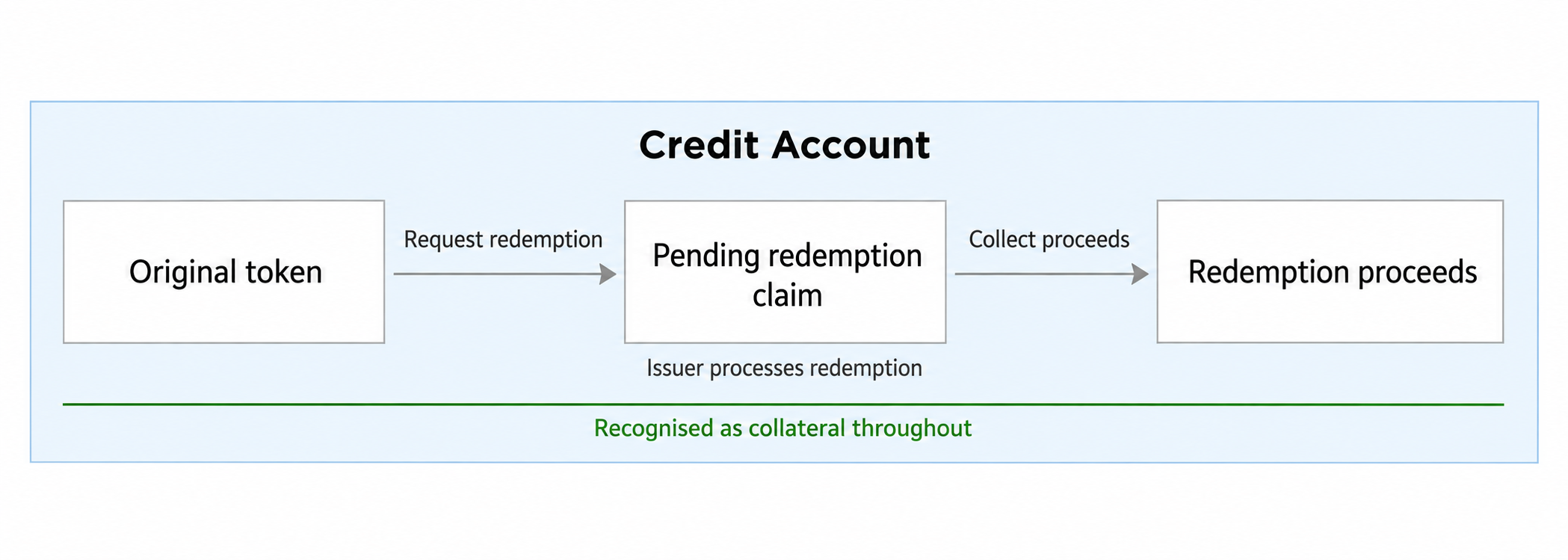
If conversion requires a redemption period, the first transaction requests redemption but cannot yet execute the steps that depend on its proceeds. For a withdrawal, the sequence becomes:
Request redemption → Wait for settlement → Claim proceeds → Repay debt → Withdraw remaining proceeds
Repayment and withdrawal funded by those proceeds must wait. The user can still perform other permitted actions, such as adding collateral or repaying debt with wallet funds.
Borrowing costs continue until repayment; keep monitoring health factor while waiting.
Claims, redeemers, and phantom tokens
The request replaces the redeemed portion of the position asset with a claim on future proceeds. These contracts and accounting concepts serve different roles:
| Concept | Role |
|---|---|
| Redeemer | an escrow contract that holds the request and claim rights on behalf of the Credit Account and receives settlement proceeds. |
| Phantom token | Gearbox's accounting representation of pending and claimable proceeds until claimed. Its value can count as Credit Account collateral under the market's oracle, liquidation threshold, and quota rules; it is not liquid cash sent to the user's wallet |
For gateway-based redemptions, the gateway records which account owns each redeemer and controls transfers of its funds. Claiming through the gateway returns the settlement proceeds to the owning account.
Liquidation is one use of this ownership model: it can transfer the redeemer to a liquidator. See redeemers during liquidation.
Monitor settlement
Use the connected sdk and the leveraged position selected in
Manage.
const withdrawals = await sdk.positions.getCurrentWithdrawals({
  chainId: position.chainId,
  creditAccount: position.creditAccount,
  creditManager: position.creditManager,
});
| Field | Type | Meaning |
|---|---|---|
data.pending | PositionPendingWithdrawal[] | Requests still waiting for settlement |
data.pending[].claimableAt | Timestamp | Expected claimable time, in Unix seconds; reread status before claiming |
data.pending[].expectedOutputs | WithdrawalOutputAmount[] | Estimated settlement outputs |
data.claimable | PositionClaimableWithdrawal[] | Matured withdrawals available to claim now |
data.claimable[].outputs | WithdrawalOutputAmount[] | Outputs of the claim; isDelayed: true means that output still needs a later claim |
data.claimable[].withdrawalPhantomToken | TokenAmount | Withdrawal representation and amount burned by the claim |
data.claimable[].claimCall | TxCall | Encoded adapter call to include in a Credit Facade multicall |
meta.chains | Per-chain metadata | Source, block, timestamp, and read status |
- Match your request using
sourceTokenandredeemerwhere available; one Credit Account may have several requests. - Proceed when your request appears in a fresh
data.claimableresponse, not merely whenclaimableAthas passed.
Claim and complete the operation
The claim executes inside a Credit Facade multicall. Choose either path:
- Follow the intent: use
finalizeto prepare the claim and remaining steps. - Choose different actions: include the claim in a custom multicall.
Follow the intent
finalize prepares the claim together with the remaining steps, such as
repaying debt and transferring the requested withdrawal to the wallet.
Here, claimableIndex is your application's selection from the fresh response,
matched to the request being completed; do not default to the first entry.
const claimable = withdrawals.data.claimable[claimableIndex];
if (!claimable) throw new Error("Selected withdrawal is not claimable");
const sim = await sdk.opportunities.prepare.finalize(position, {
  claimable,
  slippage,
});
if (!sim.ok) throw sim.error;
| Field | Type | Meaning |
|---|---|---|
claimable | PositionClaimableWithdrawal | Fresh matured withdrawal selected above |
slippage Optional | number | Swap slippage in basis points; defaults to 0 |
quotaReserve Optional | number | Extra quota buffer in basis points; defaults to 0 |
intent Optional | ResumableIntent | Operation to resume; defaults to the intent recorded in the withdrawal |
If the reader does not return an intent, pass the saved request's
delayed.record as intent to finalize.
Continue with position, sim, and owner in
Build, preview, and check.
Refresh the leveraged position and its withdrawals after confirmation.
If an output has isDelayed: true, some value still awaits settlement;
refresh the request and repeat finalization when the next proceeds are claimable.
For a full exit, verify zero debt and receipt of the remaining funds by the
recorded recipient, as described in Close.
Build a custom multicall
Include claimable.claimCall followed by your chosen actions instead of
executing the intent. The claimed token may not count as collateral, so a
claim by itself is not always a valid transaction.
See Build a custom multicall for call construction, ordering, and transaction building.