# Allow leverage strategies
## What is a strategy?
A **Strategy** (technically a "Credit Manager") is a specific credit product offered to borrowers.
While the Pool holds the liquidity, the Strategy defines **how that liquidity can be used**.
* *Example 1:* "Stablecoin Farming" (Low Risk, High LTV, Whitelisted Stablecoins only).
* *Example 2:* "Memecoin Trading" (High Risk, Low LTV, Wide asset list).
You can attach multiple Strategies to a single Pool, allowing to segment risk and offer different terms for different user behaviors.
## Prerequisites: The Strategy Library
To make setup easy, Gearbox uses **Strategy Bundles**. These are pre-configured "recipes" organized by the **Collateral Token** you want to support.
**How to check availability:**
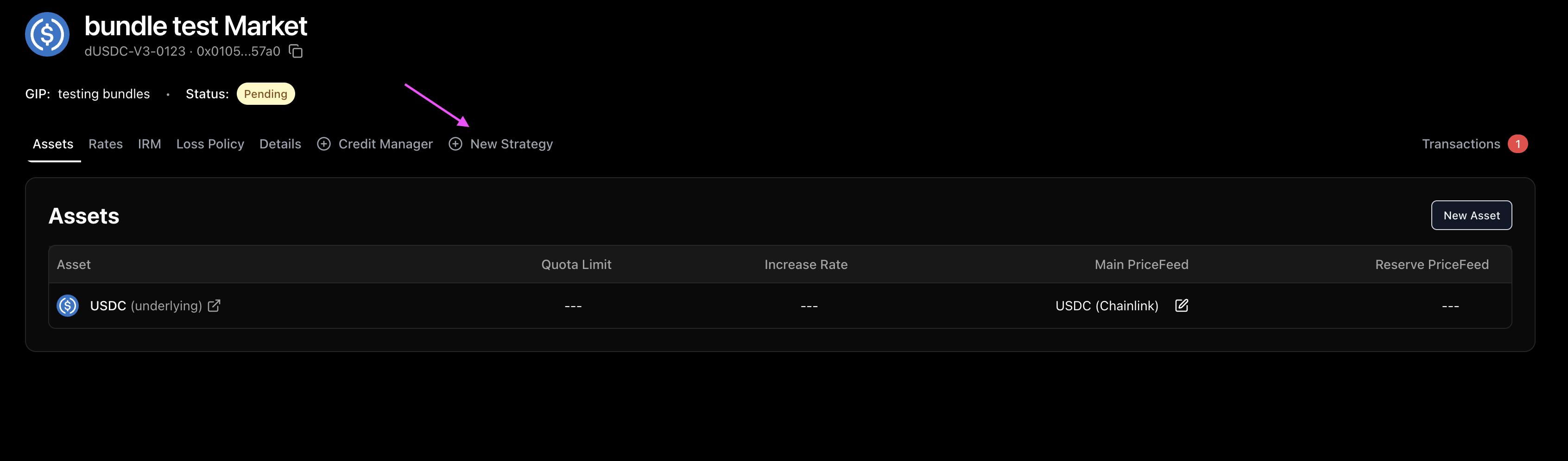
1. Open the **New Strategy** tab in the interface.
2. **Search for the Target Token** you want users to leverage (e.g., search for `wstETH` or `sUSDe`).
3. **If the token appears:** A Strategy Bundle exists. Selecting it will automatically configure the necessary smart contract connections (Adapters) to enable leverage for that asset.
4. **If the token is missing:** A bundle for this specific asset hasn't been created yet.
* *Action:* Contact Gearbox Contributors to request a new Strategy Bundle.
### How to add and configure a strategy
{% stepper %}
{% step %}
## Click on a "New Strategy" tab
{% endstep %}
{% step %}
## Select Strategy
Search for your Target Token to allow leverage on.
* *Note:* The bundle automatically handles the complex technical setup (Adapter configuration), so you only need to focus on the financial parameters.
**Liquidation Threshold (LT)**\
This determines the maximum leverage.
* *Formula:* `Max Leverage = 1 / (1 - LT)`
* *Example:* LT 90% = 10x Leverage. LT 80% = 5x Leverage.
**Interest Fee (Revenue)**\
The percentage of the borrowing interest that is captured as revenue.
* *Split:* By default, this fee is split 50/50 between Curator and the Gearbox DAO.
* *Impact:* This is charged **on top** of the base rate. If the base rate is 5% and your fee is 20%, the borrower pays 6%.
{% hint style="warning" %}
**Important:** In the current version, the Interest Fee percentage is fixed upon deployment. To change it later, you must deploy a new Credit Manager.
{% endhint %}
{% hint style="info" %}
**Growth Hack:** Set a **0% Interest Fee** initially to attract early users with cheaper rates, then launch a new "Premium" strategy later once you have traction.
{% endhint %}
{% endstep %}
{% step %}
## Liquidation Economics
These parameters ensure the system remains solvent by incentivizing third-party liquidators.
**Liquidation Premium (The Bounty)**\
The percentage of collateral given to the liquidator as a reward.
**Liquidation Fee (The Penalty)**\
The percentage of collateral taken by the Protocol (You + DAO) during a liquidation.
{% hint style="info" %}
**Risk Management Intuition:**\
The Liquidation Premium is not just a "fee", it is the **incentive** for liquidators to keep the protocol solvent by forcefully exchanging Collateral token for the Debt token.\
For the liquidations to happen organically, it must take multiple factors into account:
1. **Slippage:** The cost of selling the collateral on a DEX.
2. **Gas Costs:** The transaction fee to execute the liquidation.
3. **Time value of money + collateral risk:** If the asset is illiquid and/or has timelocked redemptions, liquidator will have to hold the collateral through redemption cycle.
4. **Oracle reliability:** Lending market values collateral by the oracle price, however "true" value at every given moment can differ with magnitude defined by oracle methodology and market conditions.
{% endhint %}
{% endstep %}
{% step %}
## Position Limits
**Min & Max Debt**\
Defines the size of accounts allowed in this strategy.
* *Min Debt:* Must be high enough to cover gas costs for liquidators. (e.g., $10,000+ on Ethereum Mainnet).
* *Max Debt:* Limits exposure to a single whale.
**Max Enabled Tokens**\
The maximum number of different tokens a user can hold as collateral simultaneously.
* *Rule of Thumb:* Keep this number low (1) for efficiency. In practice, users rarely use more than 1 unique collateral token.
{% hint style="warning" %}
**Technical Constraint:**\
The protocol enforces a ratio between your debt limits and the token count to ensure liquidations are always mathematically possible.
**Formula:** `maxDebt / minDebt <= 100 / maxEnabledTokens`
*Example:* If you allow **4 tokens**, the ratio `100/4 = 25`. Therefore, your Max Debt cannot be more than **25x** your Min Debt.\
\&#xNAN;*(If Min Debt = 10k, Max Debt must be <= 250k).*
{% endhint %}
{% endstep %}
{% step %}
## Lifecycle (Optional)
If you are running a fixed-term lending product (e.g., a "Season 1" pool or a bond-like structure), you can configure expiration settings.
**Expiration Date**\
The timestamp after which the strategy winds down.
* *Behavior:* After this date, **all** accounts can be liquidated, regardless of their Health Factor. Borrowing is disabled.
**Expired Premium & Fee**\
You can set different liquidation penalties that apply *only* after the expiration date.
* *Use Case:* Usually set lower than standard penalties to minimize users' losses if market conditions allow it.
{% endstep %}
{% step %}
#### Review & Deploy
Review the configuration summary.
{% endstep %}
{% endstepper %}
### Next Steps
Now you need to ensure that the resulting market state matches with the expectations. The best way to do it is to simulate execution of the real transactions on chain fork.
The Testing section will show how to do it.