

Add required Price Feeds
Price Feed Store (PFS)
The Price Feed Store is a chain-specific registry that lists which tokens and price feeds can be used within Gearbox on that chain.
For a token to be used as collateral, it must first be added to the Price Feed Store, along with a list of available price feeds.
Only the Instance Owner—a chain-specific multisig—can add or update entries in the Price Feed Store. This role acts as a neutral technical gatekeeper, ensuring safe and verified configurations while staying out of risk or business decisions.
The Instance Owner multisig is open to participation from active curators and chain contributors, making the process transparent and inclusive without compromising protocol safety.
How to work with PFS?
Interface for accessing each chain's PFS is located at https://permissionless.gearbox.foundation/instances.
Demo of PFS setup workflow:
What price feed sources are already integrated? (Click on feed to see details)
| Price source | Feed type | Supported collaterals & features |
|---|---|---|
| Chainlink, Redstone push, EO AggregatorV3Interface - compatible external price providers | External | Blue-chip tokens |
| ERC4626 exchange rate | ERC4626 | Most of the yield-bearing vaults |
| Pyth | Pyth | Blue chip & emerging tokens |
| Redstone pull | Redstone | Deployed on any EVM on day 0 |
| Upper bound | Bounded | Bound borrowed tokens to protect borrowers from liquidationsBound collateral tokens to protect LPs from price manipulation |
| Multiply 2 feeds price | Composite | Optimal way to price correlated token pairs |
| Constant price | Constant | Hardcode pegged assetsApply premium or discount combining with composite feed |
| Curve LP | Curve_crypto Curve_stable | Collateralize Curve LP tokens |
| Token price from Curve Pool | Curve TWAP | Collateralize experimental tokens with pricing based on DEX trades |
| Pendle PT | Pendle PT TWAP | Get TWAP market price of PTs |
| Kodiak Island | Kodiak_island | Get island share price |
Updatable LP bounds
Some tokens in Gearbox are tokenized vault shares — they represent ownership of assets inside a vault or liquidity pool. Examples include:
- Vault tokens like ERC-4626 share tokens
- LP tokens from DEXs or yield strategies
How pricing works:
- Each share has an exchange rate to its underlying asset (e.g., 1 share = X ETH).
- The LP price feed combines:
- the share price from the vault, and
- the USD price of the underlying asset.
Why bounds are needed:
- Vault share prices can be manipulated or distorted through smart-contract exploits.
- Normally, share prices move slowly and predictably with yield — not like volatile traded tokens.
To protect against abnormal price swings, Gearbox sets updatable bounds:
- A minimum and maximum price for each LP share.
- These bounds cap sudden drops or spikes in reported prices.
- They are updated periodically to track the vault’s real exchange rate as it appreciates over time.
This mechanism keeps LP pricing stable, reliable, and manipulation-resistant while still following genuine on-chain growth.
Setup details
Pyth
Click New Feed and select Pyth type
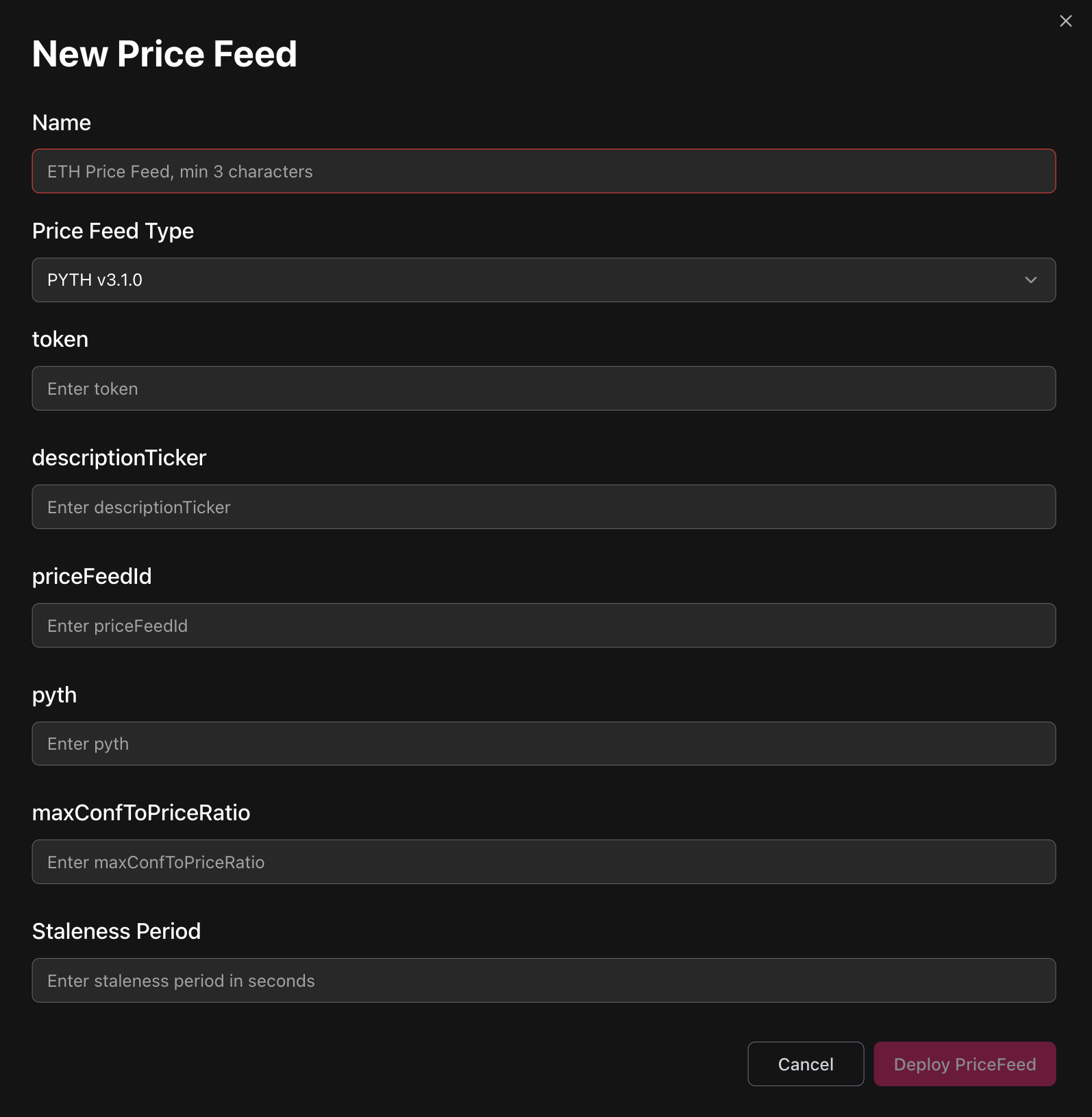
Pyth dashboard with feeds info: https://insights.pyth.network/price-feeds
-
Name:
- Specify token Symbol and Price methodology
- Examples:
- Name: RLP (Redemption rate)
Feed: https://insights.pyth.network/price-feeds/Crypto.RLP%2FUSD.RR - Name: RLP (Market)
Feed: https://insights.pyth.network/price-feeds/Crypto.RLP%2FUSD
- Name: RLP (Redemption rate)
-
Token:
- Token address
Needed for Gearbox contracts to understand what pull feed needs to be updated
- Token address
-
descriptionTicker
- The same as name
This parameter is to be removed later
- The same as name
-
priceFeedId
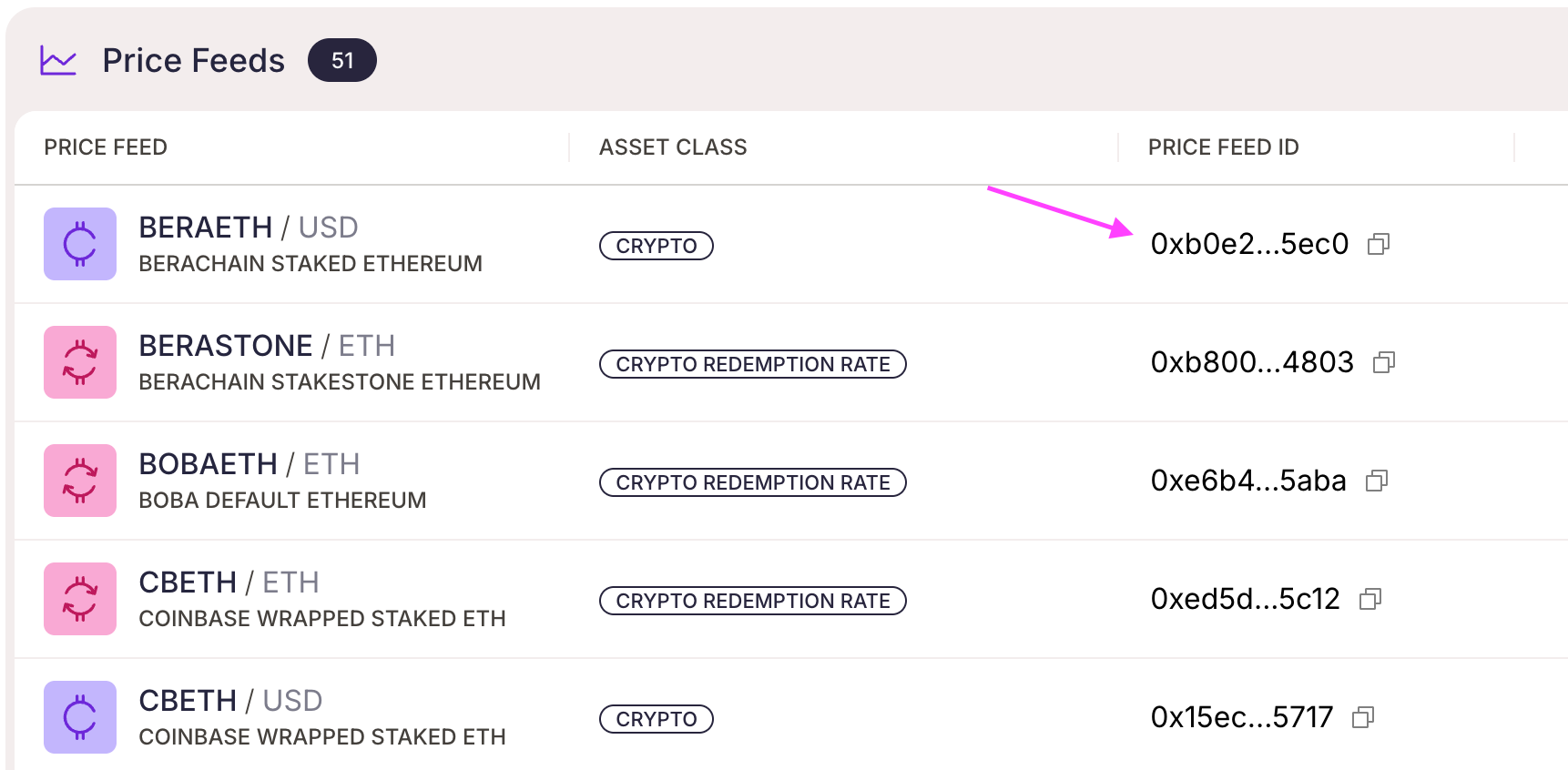
-
Pyth
- Address of Pyth singleton contract on the target chain
see here: https://docs.pyth.network/price-feeds/contract-addresses/evm- Ethereum - 0x4305FB66699C3B2702D4d05CF36551390A4c69C6
- Berachain - 0x2880aB155794e7179c9eE2e38200202908C17B43
- Etherlink - 0x2880aB155794e7179c9eE2e38200202908C17B43
- Address of Pyth singleton contract on the target chain
-
maxConfToPriceRatio (takes value in bps: 300 = 3%)
- Except for the current price, Pyth returns confidence interval
- If the width of confidence interval in % is larger than this parameter, feed ourput is considered invalid causing tx revert
- Example (consider maxConfToPriceRatio = 3%)
- Valid price:
- Price: 3000
- Confidence interval: 15
- confToPriceRatio = 15/3000 = 0.5%
- Invalid price:
- Price: 3000
- Confidence interval: 120
- confToPriceRatio = 120/3000 = 4%
- Valid price:
- Example (consider maxConfToPriceRatio = 3%)
-
Staleness Period
- Gearbox contracts track the timestamp of last Feed's update
If the update happened more than Staleness Period seconds ago, feed value should be updated or the contracts will revert - Recommended value for Pull feeds: 240s = 4min
- Gearbox contracts track the timestamp of last Feed's update
Right after a new Pyth feed is deployed it's required to send 0.000001 ETH to its address. Without it won't function and can't be added to Price Feed Store.
External feeds
Click New Feed and select External type
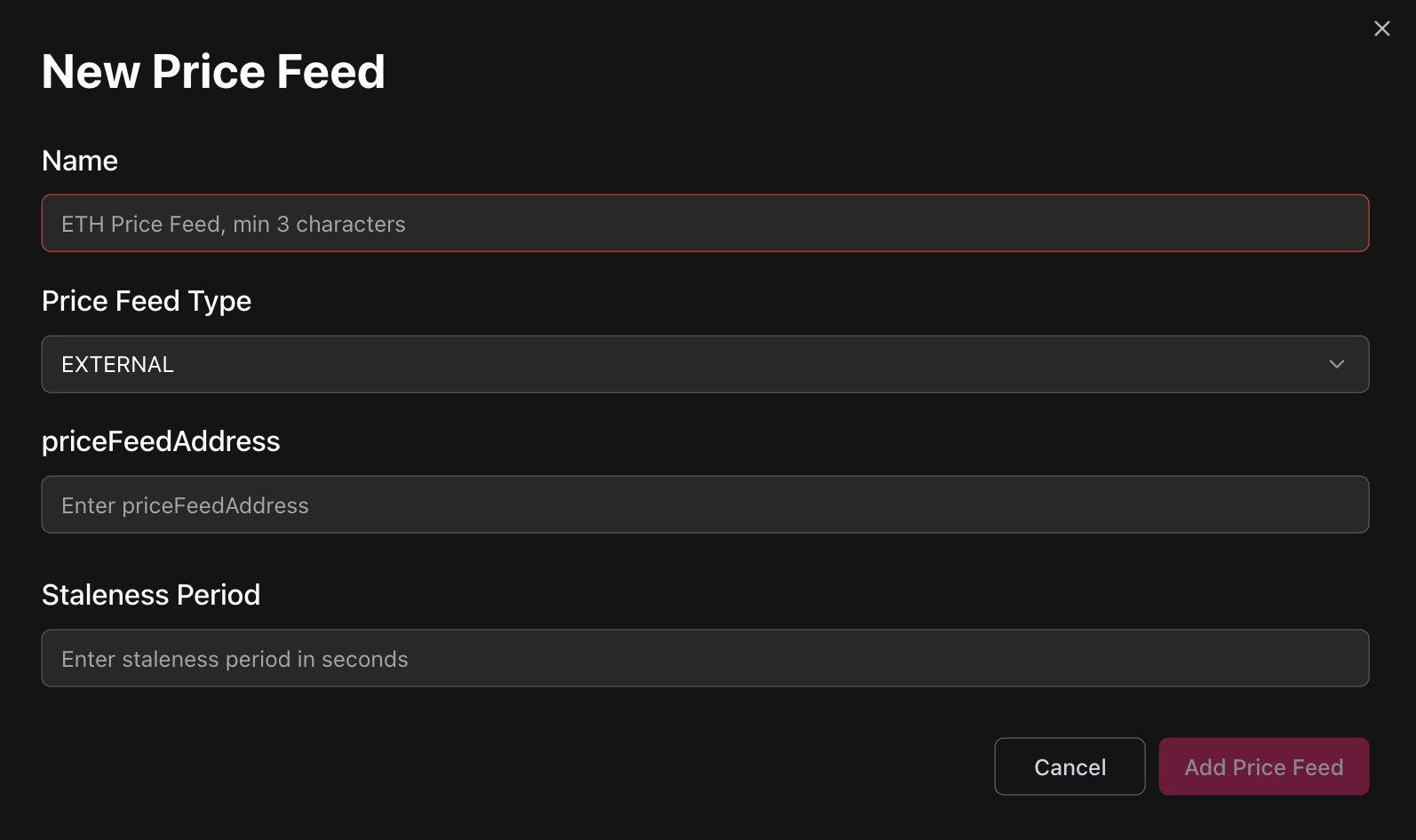
Dashboards of external providers:
- Redstone: https://app.redstone.finance/app/feeds/
- Chainlink: https://docs.chain.link/data-feeds/price-feeds/addresses?page=1&testnetPage=1
- EO: https://docs.eo.app/docs/eprice/feeds-addresses/price-feed-addresses
- Some protocols may provide custom feeds compatible with AggregatorV3Interface
External feed parameters
- Name:
- Specify token Symbol and Provider name
- Examples:
- USDC (Chainlink)
- hemiBTC (EO)
- ETH (Redstone Push)
- mTBILL (Midas NAV)
- priceFeedAddress
- Address of deployed feed
- Staleness Period (in seconds)
- Gearbox contracts track the timestamp of last Feed's update
If the update happened more than Staleness Period seconds ago contracts will revert
&#xNAN;Motivation: If the feed with heartbeat of 24 hours wasn't updated in the last 30 hours, smth bad happened with the oracle providers and protocol operations are blocked waiting for Curator to interfere - Recommended value:
- Heartbeat + 15 minutes for slower chains (Ethereum)
- 87 300s = 24h + 15min
- Heartbeat + 2 minutes for faster chains
- 86 520s = 24h + 2min
- Heartbeat + 15 minutes for slower chains (Ethereum)
- Gearbox contracts track the timestamp of last Feed's update
ERC4626 exchange rate
This contract fetches mint/redeem rate from specified erc4626 vault and multiplies it by the underlying feed output to return the vault shares' USD price.
Click New Feed and select ERC4626 type
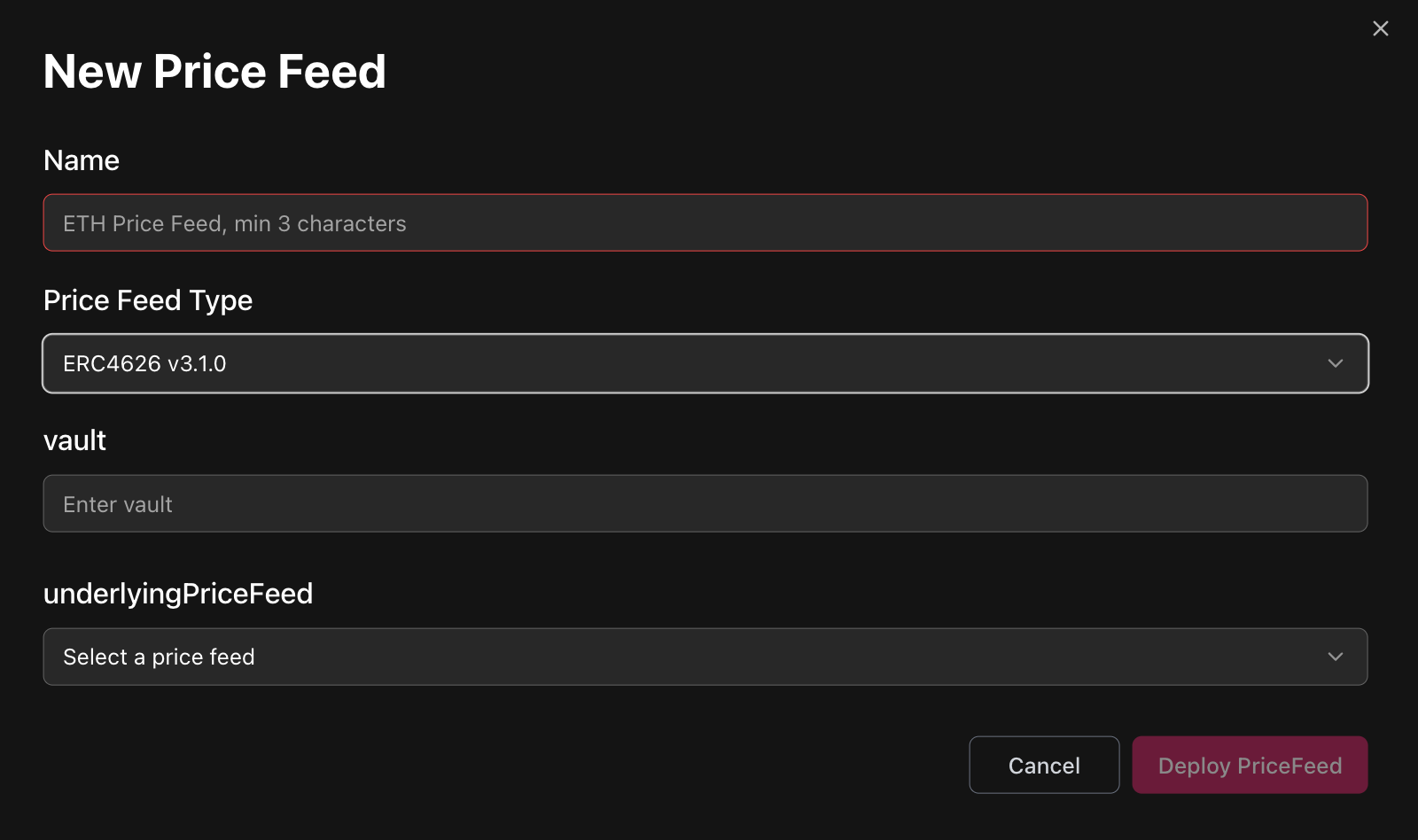
ERC4626 exchange-rate parameters
- Name:
- Specify token Symbol and underlying feed price Provider name
- Example:
- Name: sDAI (Chainlink)
Will mean that this feed takes ERC4626 sDAI/DAI exchange rate directly from sDAI contract + DAI/USD price from Chainlink
- Name: sDAI (Chainlink)
- Vault:
- Address of ERC4626 vault to fetch mint/redeem rate from.
- underlyingPriceFeed:
- Select existing price feed
- Example:
- If the specified vault it sUSDe, then underlying price feed should return USDe/USD price.
To understand what asset's feed should be passed as underlying, go to the ERC4626 vault contract and call its asset() method — you will get the address of the token which is vault's underlying.
Redstone pull
Click New Feed and select Redstone type
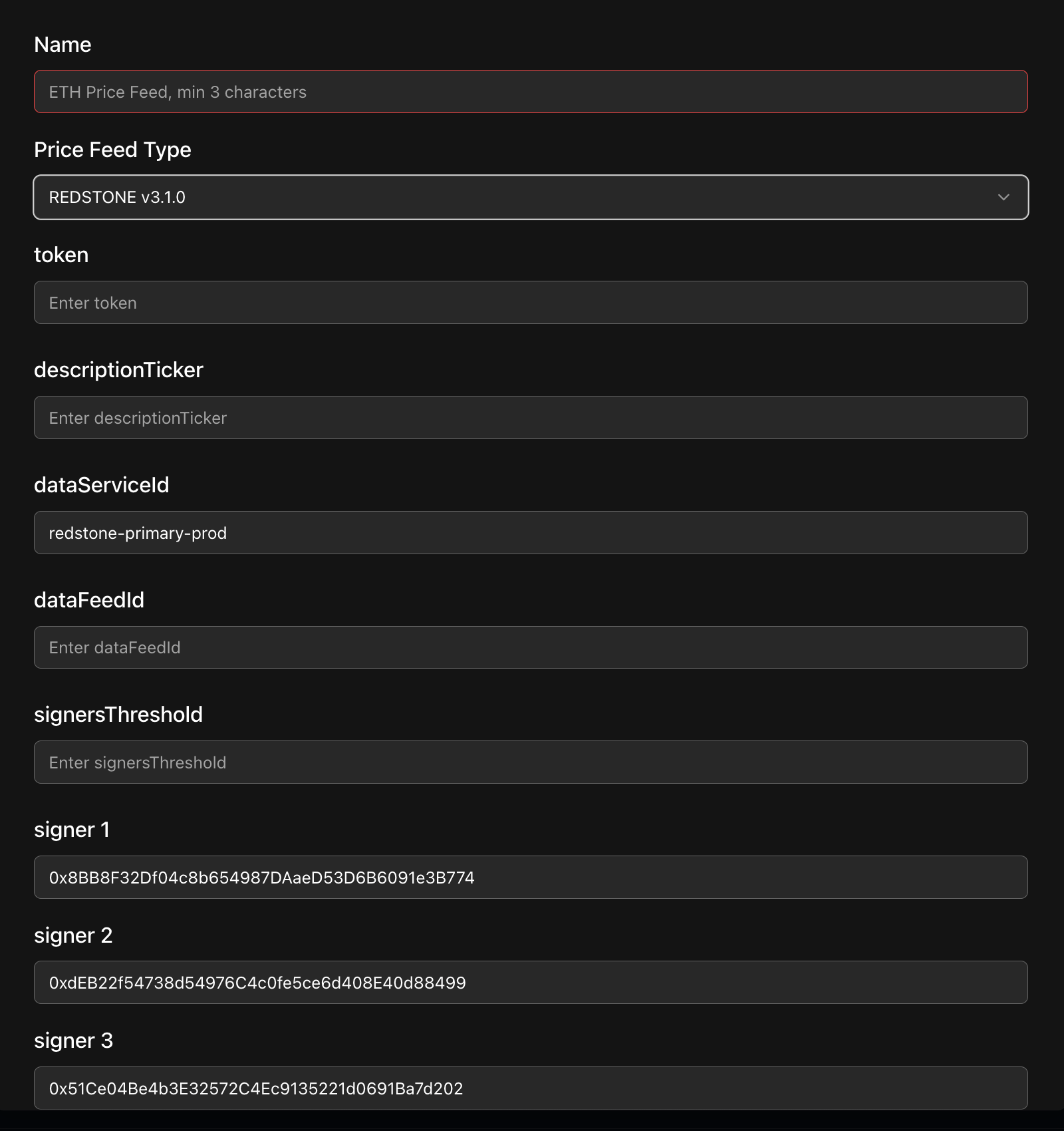
Redstone pull parameters
- Name:
-
Specify token Symbol and Price methodology
Examples:
- Name: ezETH (Market)
Feed: https://app.redstone.finance/app/token/ezETH/ - Name: ezETH (Fundamental)
Feed: https://app.redstone.finance/app/token/ezETH_FUNDAMENTAL/
- Name: ezETH (Market)
-
- Token:
- Token address
Needed for Gearbox contracts to understand what pull feed needs to be updated
- Token address
- descriptionTicker
- The same as name
This parameter is to be removed later
- The same as name
- dataServiceId
- Most likely should be kept untouched
Internal variable for non-standard sources of redstone data
- Most likely should be kept untouched
- dataFeedId
-
The same as Symbol in Redstone UI
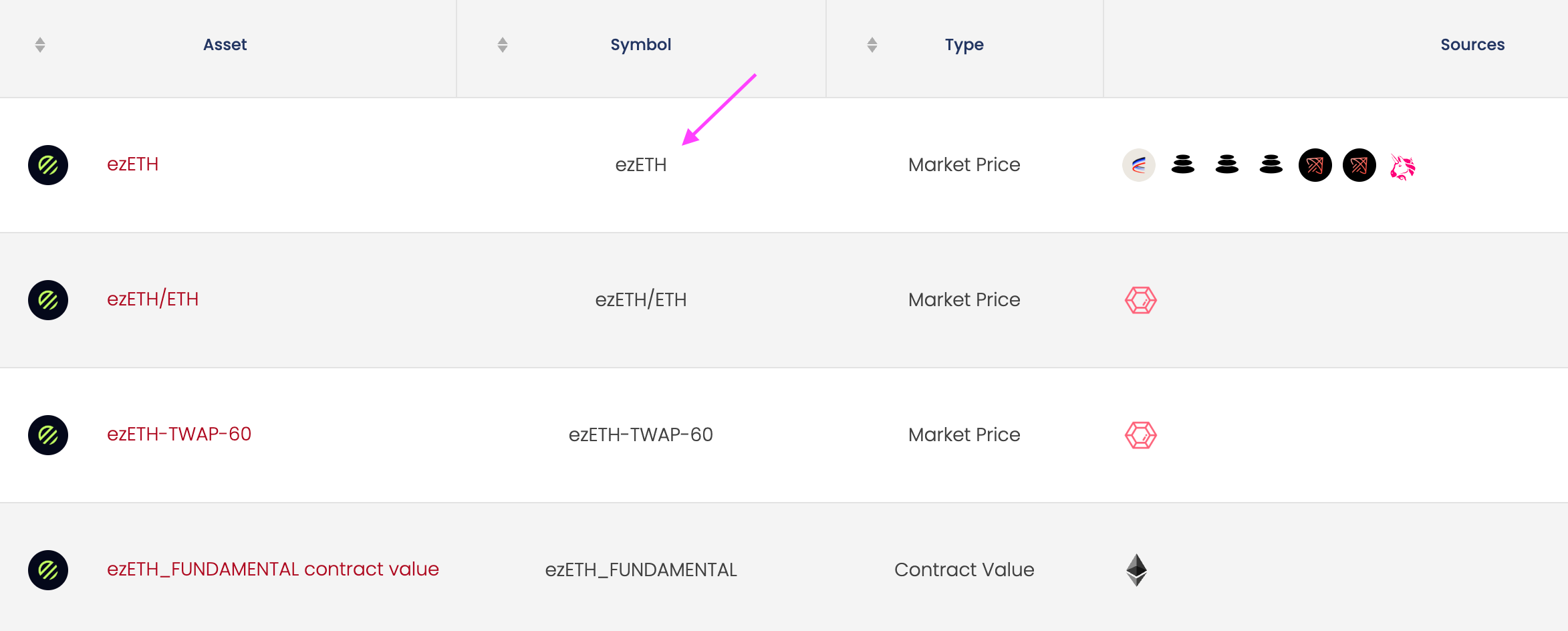
-
- signersThreshold
- Minimum amount of signatures from Redstone nodes to have for the feed's result to be deemed valid.
- Redstone currently have maximum of 5 nodes.
- The safest option is to set this value to 5 (this was historically used in Gearbox), but sometimes couple of Redstone nodes may stop working for a short periods of time.
- Signer 1/2/3/4/5
- Most likely should be kept untouched
Redstone have fixed list of signers' addresses that rarely (if ever) changes
- Most likely should be kept untouched
Kodiak island
Click New Feed and select Kodiak_island type
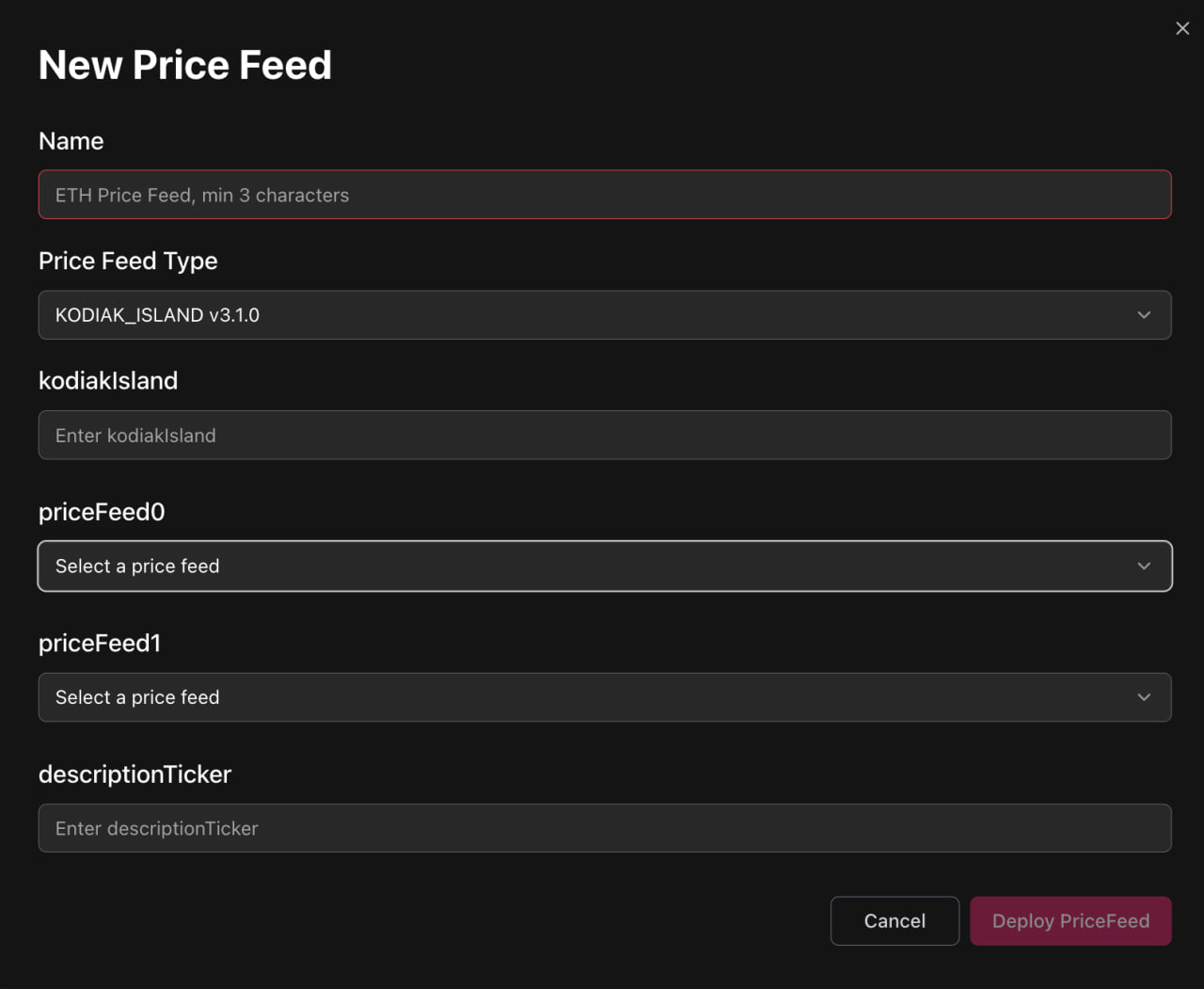
Kodiak Island parameters
- Name:
- Specify token Symbol and sources of Underlying Prices
Example:- Name: iBERA-iBGT (Pyth; Redstone push)
- Island
- Feed0: Pyth iBERA
- Feed1: Redstone push iBGT
- Name: iBERA-iBGT (Pyth; Redstone push)
- Specify token Symbol and sources of Underlying Prices
- kodiakIsland:
- Island Address
- PriceFeed0
- Select the feed from already added to price token with 0'th index in terms of USD
- PriceFeed1
- Select the feed from already added to price token with 1'st index in terms of USD
- descriptionTicker
- The same as name
This parameter is to be removed later
- The same as name
Pendle PT
Before any deployment, ensure that pendle market has correct cardinality. It should be no less than twapWindow / blockTime + 1 for a given chain.
To check cardinality, go to LP contract and get _storage()[4].
To update cardinality, call increaseObservationsCardinalityNext of an LP contract.
Pendle PT via the Chainlink-compatible factory
- Factory Addresses:
- Plasma: 0xAcD67f36183c8bA6b80Cfa60375510Ce17D0dd26
- Mainnet: 0x9E5129dcC15d39625617DcD7F0F44FB0BB957FFd
-
Deploy PT to SY oracle using createOracle Factory method
Market: Pendle Market address
twapDuration: twap duration in seconds (1800 recommended)
baseOracleType: 0 (PT to SY price)
-
Add deployed pendle feed as external (staleness period = 1)
-
Deploy Composite Gearbox Oracle
Set Feed 1 to previously deployed PT-to-SY feed
Set Feed 2 to feed which prices SY to USD
SY to USD feed shouldn't be of updatable type (Redstone Pull or Pyth pull)
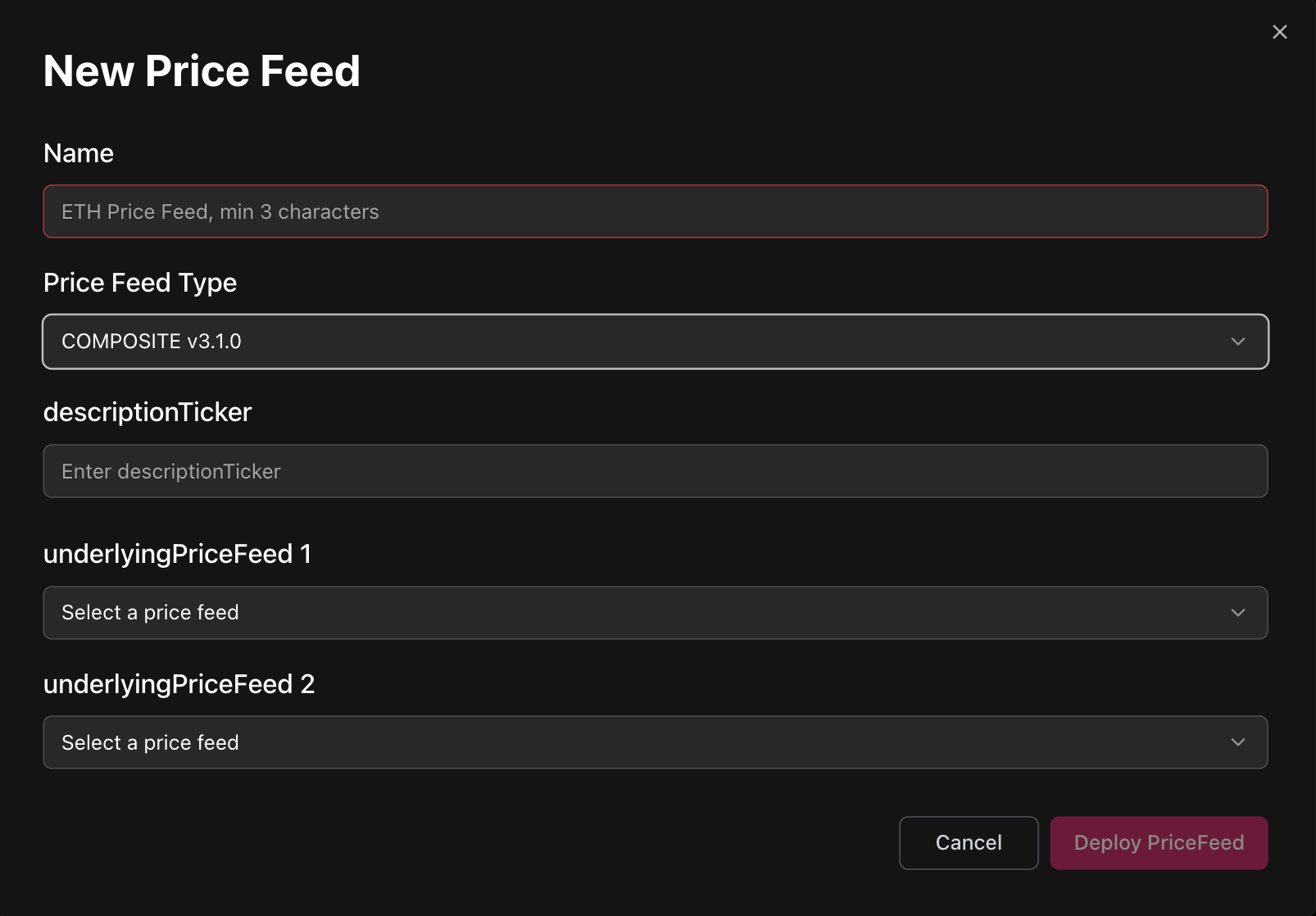
-
Deploy Bounded Gearbox Oracle
Set underlying feed to previously deployed Composite feed
Set bound to 1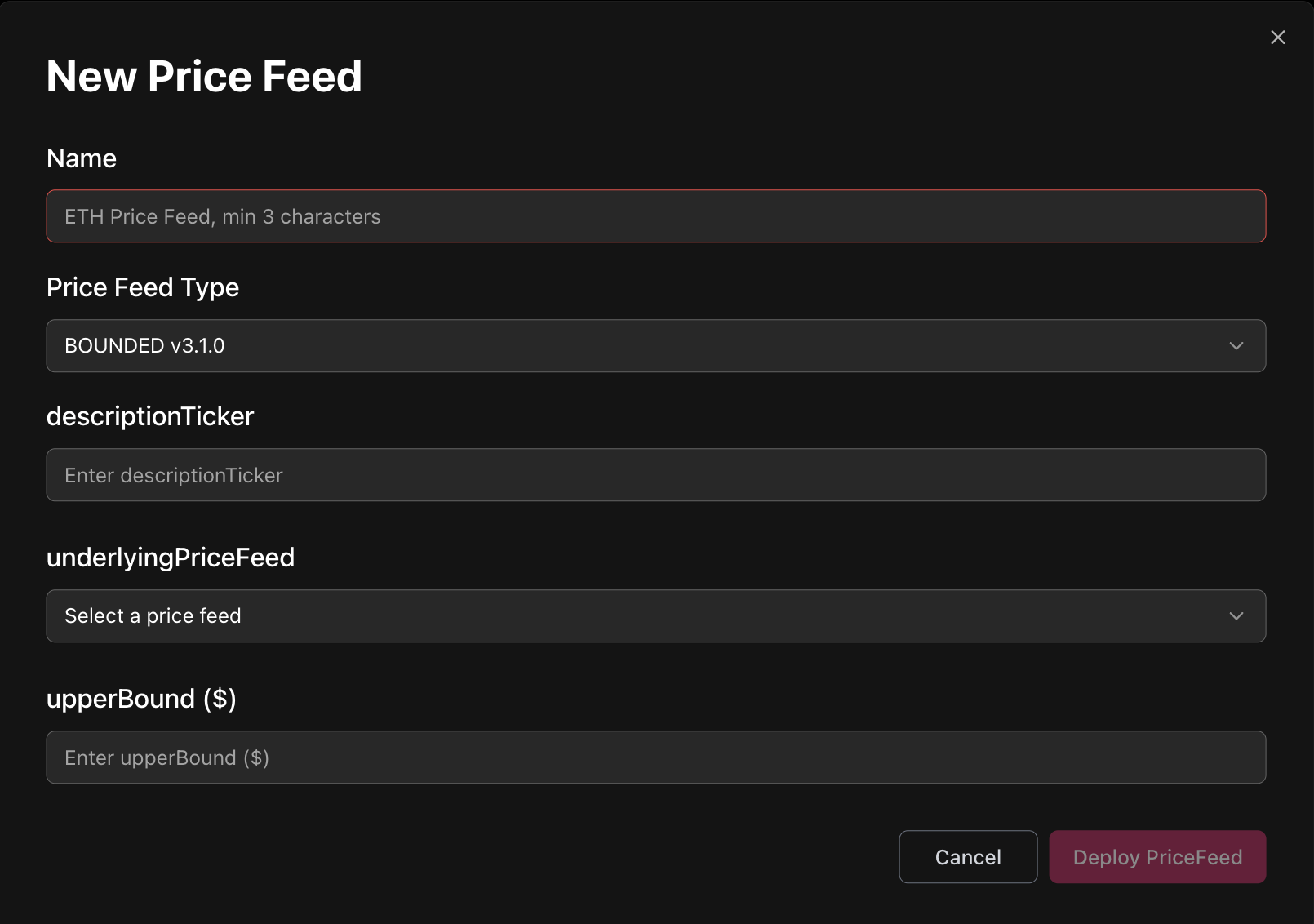
Native Gearbox PT feed
Click New Feed and select Pendle PT TWAP type
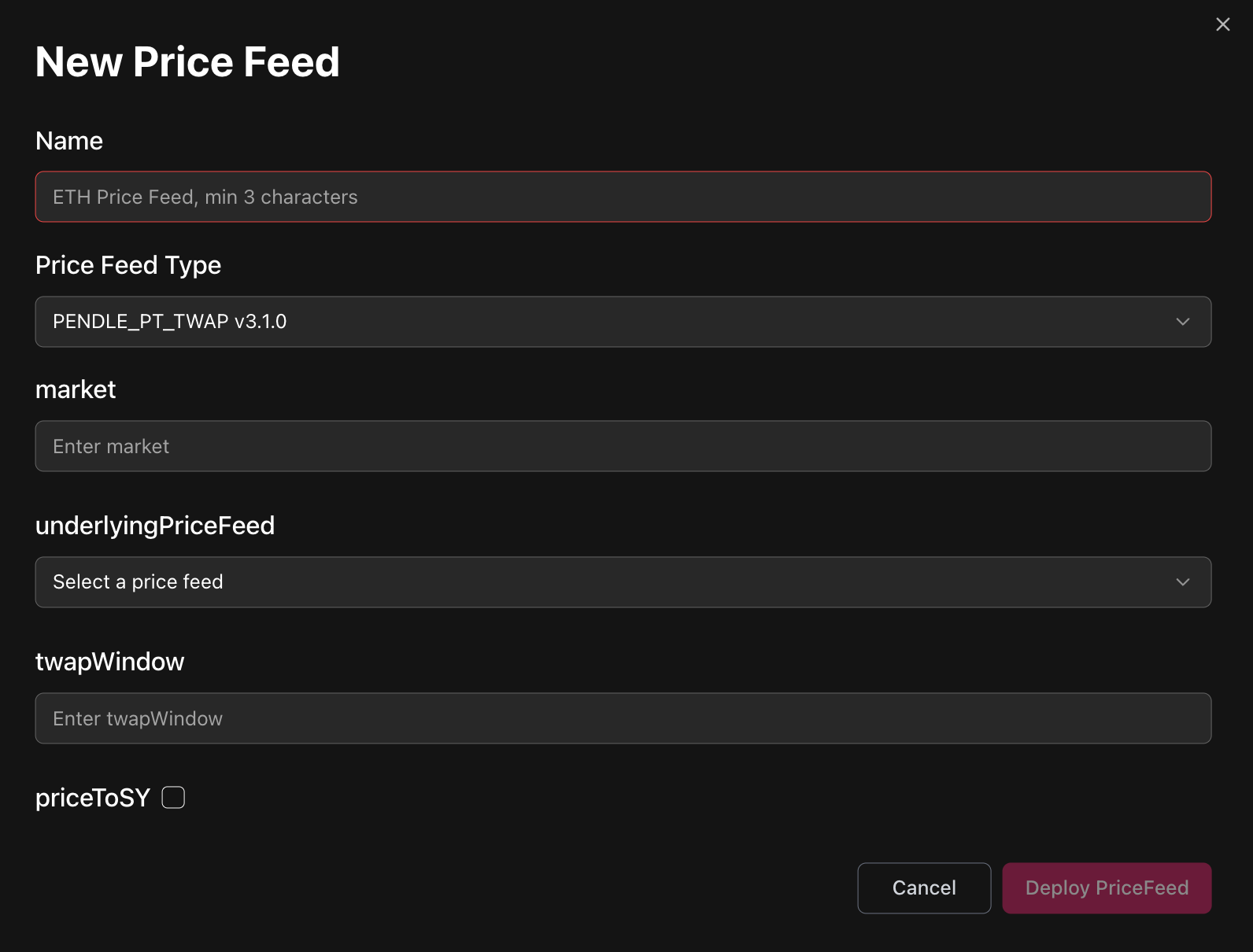
Pendle PT parameters
- Name:
- Specify token Symbol and source of Underlying Price
Example:- Name: PT-sUSDE-25SEP2025 (Chainlink)
- Underlying feed: sUSDe/USD (Chainlink)
- Name: PT-sUSDE-25SEP2025 (Chainlink)
- Specify token Symbol and source of Underlying Price
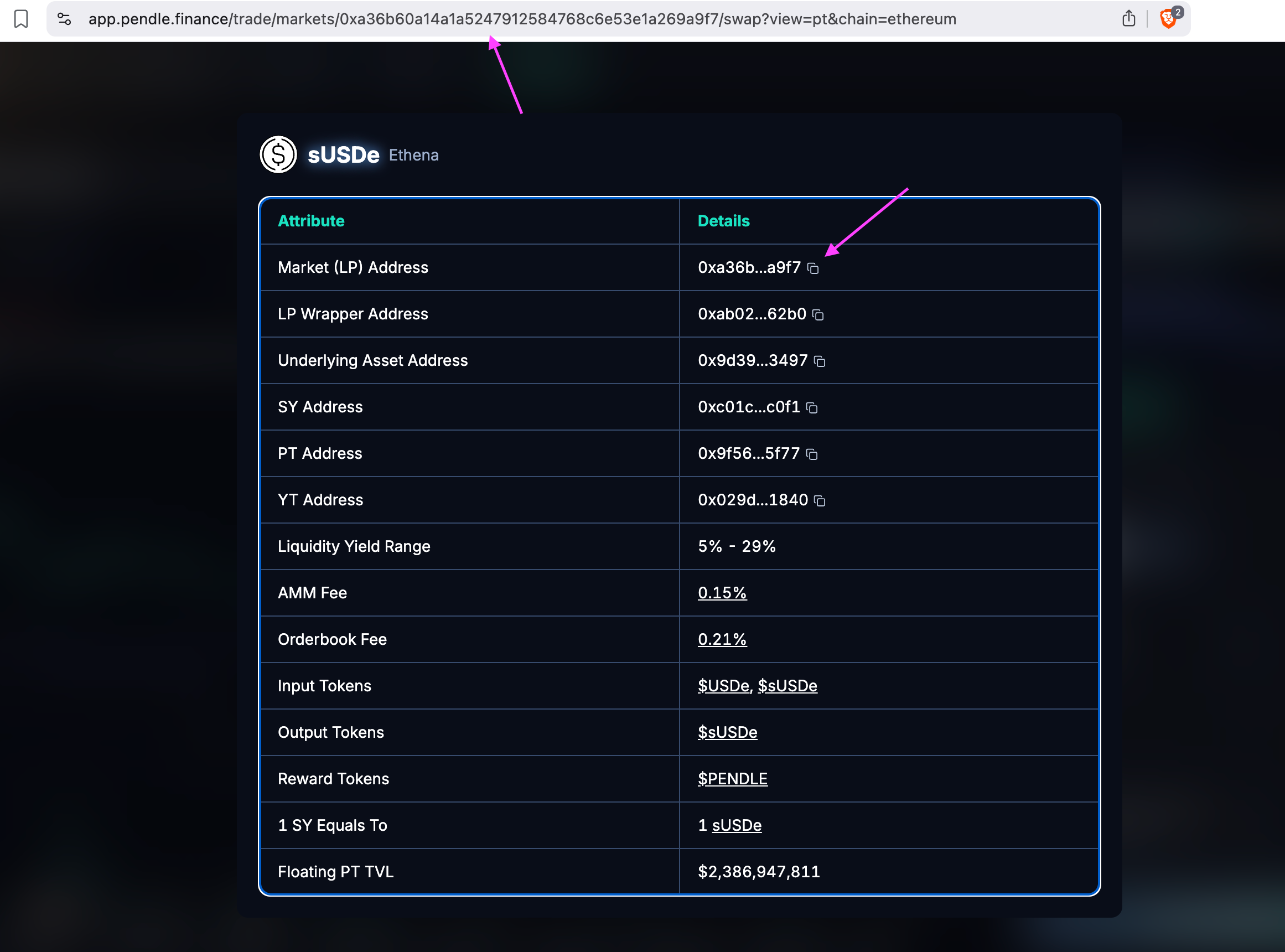
- market
-
Pendle Market address
-
- UnderlyingPriceFeed
- The feed contract is able to fetch price of PT token in terms of SY token from the Pendle Market and then multiplies it by SY price in terms of USD ⇒ underlying feed is an intended method to price SY in terms of USD.
- priceToSy
- Most likely you need to check this box (if on the previous step you set underlying price feed to be equal to SY price)
- If you don't check this box, you will need to use asset price as underlying price feed. (read more about the difference between Asset and SY here)
- twapWindow
- The window length in seconds for averaging market price
- Value of 1800s was usually used for previous deployments
Bound the PT oracle
Set underlying feed to previously deployed PT TWAP feed
Set bound to 1
Curve Stable
Click New Feed and select Curve_stable type
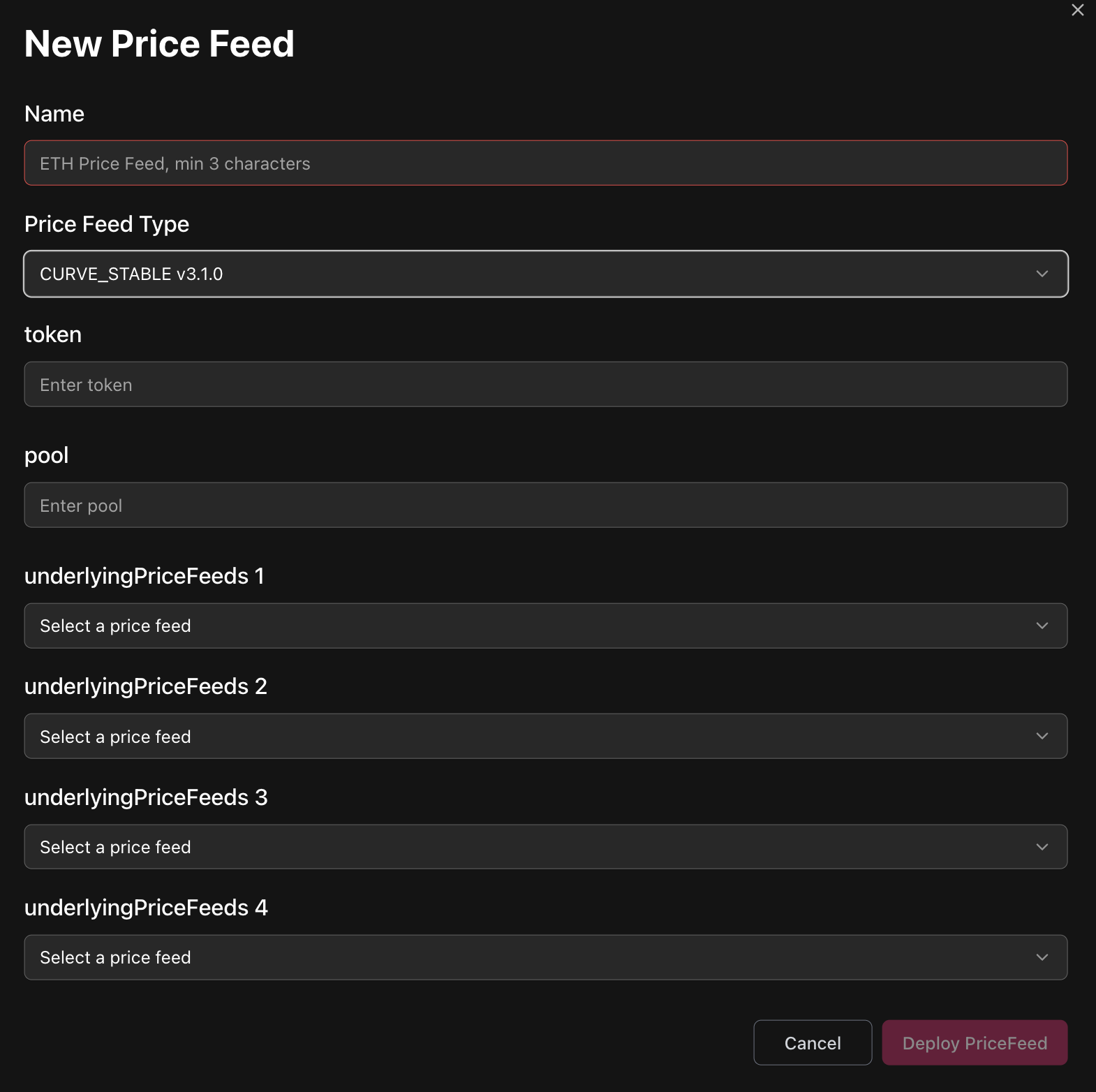
Curve Stable parameters
- Name
- Specify pool Symbol and sources of Underlying Prices
Example:- Name: crvUSD-USDC (Chainlink)
- Pool
- Feed0: Chainlink crvUSD
- Feed1: Chainlink USDC
- Name: crvUSD-USDC (Chainlink)
- Specify pool Symbol and sources of Underlying Prices
- Token
-
LP token address
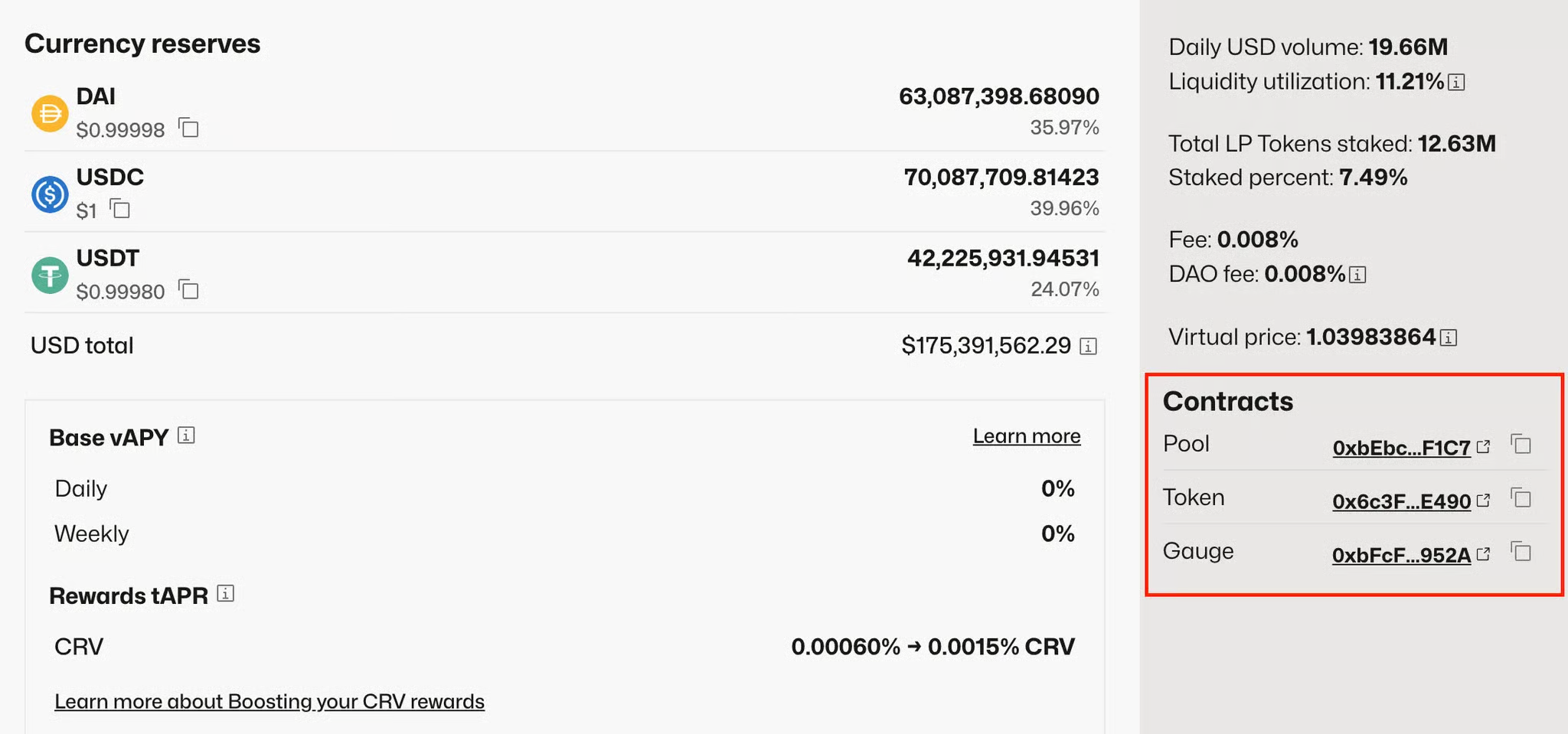
-
- Pool
-
The address of the pool
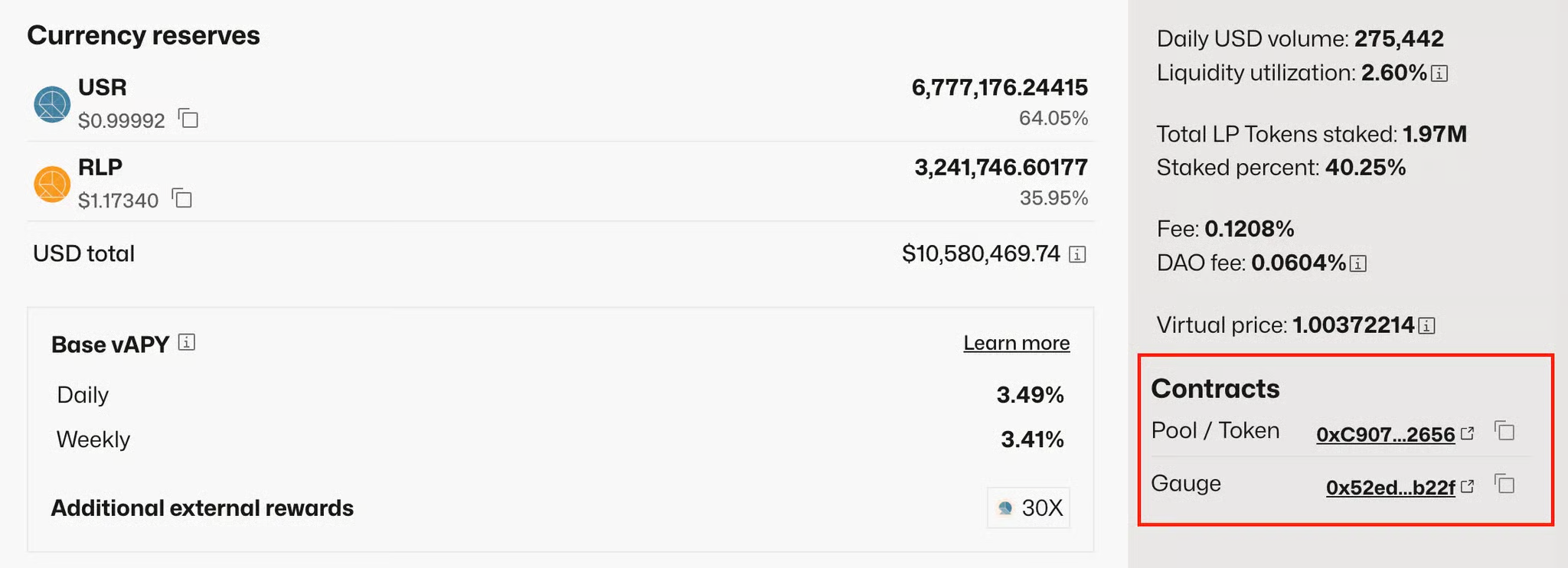
-
- underlyingPriceFeed 0/1/2/3
- Select a feed from allowed list to price pool's tokens at given indexes
- If pool has only 2 tokens in it, specify only underlyingPriceFeed0 & 1
Pendle LP
Before any deployment, ensure that pendle market has correct cardinality. It should be no less than twapWindow / blockTime + 1 for a given chain.
To check cardinality, go to LP contract and get _storage()[4].
To update cardinality, call increaseObservationsCardinalityNext of an LP contract.
Pendle LP via the Chainlink-compatible factory
- Factory Addresses:
- Plasma: 0xAcD67f36183c8bA6b80Cfa60375510Ce17D0dd26
- Mainnet: 0x9E5129dcC15d39625617DcD7F0F44FB0BB957FFd
-
Deploy PT to SY oracle using createOracle Factory method
Market: Pendle Market address
twapDuration: twap duration in seconds (1800 recommended)
baseOracleType: 2 (LP to SY price) -
Add deployed pendle feed as external (staleness period = 1)
-
Deploy Composite Gearbox Oracle
Set Feed 1 to previously deployed LP-to-SY feed
Set Feed 2 to feed which prices SY to USD
SY to USD feed shouldn't be of updatable type (Redstone Pull or Pyth pull)
-
Deploy Bounded Gearbox Oracle
Set underlying feed to previously deployed Composite feed
Set bound to 1
Native Gearbox Pendle LP feed
Click New Feed and select Pendle PT TWAP type
Pendle LP parameters
- Name:
- Specify token Symbol and source of Underlying Price
Example:- Name: PT-sUSDE-25SEP2025 (Chainlink)
- Underlying feed: sUSDe/USD (Chainlink)
- Name: PT-sUSDE-25SEP2025 (Chainlink)
- Specify token Symbol and source of Underlying Price
- market
-
Pendle Market address
-
- UnderlyingPriceFeed
- The feed contract is able to fetch price of PT token in terms of SY token from the Pendle Market and then multiplies it by SY price in terms of USD ⇒ underlying feed is an intended method to price SY in terms of USD.
- priceToSy
- Most likely you need to check this box (if on the previous step you set underlying price feed to be equal to SY price)
- If you don't check this box, you will need to use asset price as underlying price feed. (read more about the difference between Asset and SY here)
- twapWindow
- The window length in seconds for averaging market price
- Value of 1800s was usually used for previous deployments
Bound the Pendle LP oracle
Set underlying feed to previously deployed PT TWAP feed
Set bound to 1